On-Premise Integration
- Device Mode: USB – RS232 – WiFi – Ethernet
- Host Modes: Direct API Device – App 2 App Inter-Link
REST API specification for integrating a third-party POS system with a payment terminal over a local network. Covers all transaction types, receipt options, async mode, and signature approval flow.
Introduction
Payment gateway integration with a POS system enables customers to make purchases quickly and securely from their POS device to the Payment terminal. We integrated a payment gateway with a POS system according to PCI DSS and PA DSS standards.
The POS Adaptor API is consumed by a POS or middleware system talking to a payment terminal on a local network. All requests and responses use JSON.
- SessionId — valid GUID/UUID generated by the POS software; maximum 36 characters; must be globally unique for each transaction request.
- Base endpoint — the IP address (local network) of the terminal which runs the Payment app.
- X-API-KEY — required when the TMS-configured authorization key is set. Missing or wrong key returns an error response. The client may generate the key in any form (maximum 32 characters); the value configured in TMS and the value sent in
X-API-KEYmust be identical. Sample TMS key:6B9F2A81D3E47C5A0B1F9E8D7C6B5A43.
Postman REST client. Send requests, inspect responses, and easily debug REST APIs.
- Configure the terminal IP address and port on the local network (the base endpoint of the Payment app).
- Generate a sessionId (UUID, max 36 characters) — unique for each transaction request.
- (Optional) Add the
X-API-KEYheader if TMS request authorization is configured. - Construct the request URI and POST or GET to the appropriate endpoint — see API Requests below.
Sync vs Async Mode
Transaction requests support two communication modes. The default is synchronous (AsyncMode disabled). Set AsyncMode enabled to use async mode — the terminal returns an immediate status acknowledgement and the client polls querytransaction for the final result.
The POS sends a request and blocks until the terminal returns the full HTTP response. Single request, single response.
Summary
- Default mode for all endpoints — transaction and non-transaction.
AsyncModedefaults to disabled.- POS waits and blocks until the HTTP response arrives.
- Single request → single response.
Transactions in async mode allow the merchant to call the API to start the transaction and receive its status immediately, without waiting for the POS terminal to complete the transaction for a final response. The client retrieves the current status by calling querytransaction.
Summary
- Only available for transaction endpoints (
POST /transactionwithAsyncModeenabled). - Initial response
ResponseTypeis always"querytransaction". - POS must poll
GET /querytransactionrepeatedly using the samesessionIdas the original transaction URL. - When
Status = 11(WaitingForSignatureConfirmationFromClient) withDigitalSigpresent, callPOST /approvesignature(samesessionId) then continue polling — see Table ENUM-12. - When
Status = 1(TransactionCompleted), theTransactionobject contains the full result — see Table ENUM-12.
Enum table — colocated with Sync vs Async. Used by Query Transaction and async Status on transaction responses. Also in Table Index.
Here are some values for the Status and StatusText fields returned in async mode responses (ResponseType: "querytransaction").
| Value of "Status" field | Value of "StatusText" field | Describe |
|---|---|---|
| None = 0 | No active transaction stage. | |
| TransactionCompleted = 1 | Transaction completed | The transaction has been completely processed. The Transaction object in the response contains the full result when status equals 1. |
| Initialize = 2 | Initializing transaction | The transaction is being initialized. |
| AwaitingUserInteraction = 3 | Awaiting user interaction | Waiting for the user to complete required actions (signature, select account type ...) |
| WaitingForCard = 4 | Waiting for card | Waiting for the card to be presented. |
| CardProcessing = 5 | Card processing | The card is currently being processed. |
| TransactionProcessing = 6 | Transaction Processing | The transaction is being processed. |
| TransactionProcessed = 7 | Transaction Processed | The Transaction has been processed. |
| WaitingForCardRemove = 8 | Waiting For Card Remove | The transaction requires selecting an waiting for card remove. |
| WaitingForMerchantCard = 9 | Waiting For Merchant Card | The transaction requires the user to swipe merchant card. |
| WaitingForSignatureConfirmation = 10 | Waiting For Signature Confirmation | The payment app is auto-approving the signature without POS app interaction. |
| WaitingForSignatureConfirmationFromClient = 11 | Waiting For Signature Confirmation From Client | Waiting for the POS app to approve or reject the captured signature. Call Approve Signature (POST /approvesignature) with DigitalSig data, then continue polling. |
| GettingSignatureFromCustomer = 12 | Getting Signature From Customer | The system is prompting the customer to provide a signature. |
| DCCSelecting = 13 | DCC Selecting | The system is presenting DCC (Dynamic Currency Conversion) options to the user. |
| SelectAccountType = 14 | Select Account Type | Waiting for the cardholder to select an account type. |
| EnterPin = 15 | Enter PIN | Waiting for the cardholder to enter a PIN. |
| WaitingForProductData = 16 | Waiting For Product Data | Waiting for product/SKU data from the POS. |
API Requests
The request URI is made up of three parts: the base URL, a sessionId, and the type of request to make.
- The base endpoint is the IP address (local network) of the terminal which runs the Payment app.
- A sessionId is a valid UID that identifies the current third-party software request. This must be generated by the POS using standard GUID/UUID generating libraries — maximum 36 characters — and must be a standard, globally unique UUID value for each transaction request.
- The request type portion of the path is the endpoint suffix for the function being called (see Request Types below).
- An API Request object should be constructed and posted to the appropriate API endpoint.
| URI |
|---|
| https://{{pos-server}}:{{pos-port}}/v1/sessions/{{sessionId}}/transaction |
| https://{{pos-server}}:{{pos-port}}/v1/sessions/{{sessionId}}/querytransaction |
| https://{{pos-server}}:{{pos-port}}/v1/sessions/{{sessionId}}/merchantlist |
| https://{{pos-server}}:{{pos-port}}/v1/sessions/{{sessionId}}/settlement |
| https://{{pos-server}}:{{pos-port}}/v1/sessions/{{sessionId}}/approvesignature |
This feature is not a default-enabled one, so resellers need to set the key from TMS to restrict clients' requests. After configuring this authorization value, clients need to add it as a header item to authorize requests (X-API-KEY). The Authorization Key set in TMS allows a maximum of 32 characters.
There is no required generation algorithm. The client may create the key in any format they choose (letters, digits, hex string, etc.), as long as the same value is configured on TMS and sent in the X-API-KEY request header.
Sample Authorization Key used as a TMS template default:
6B9F2A81D3E47C5A0B1F9E8D7C6B5A43If the header is missing or contains an incorrect key, the terminal returns an error response.
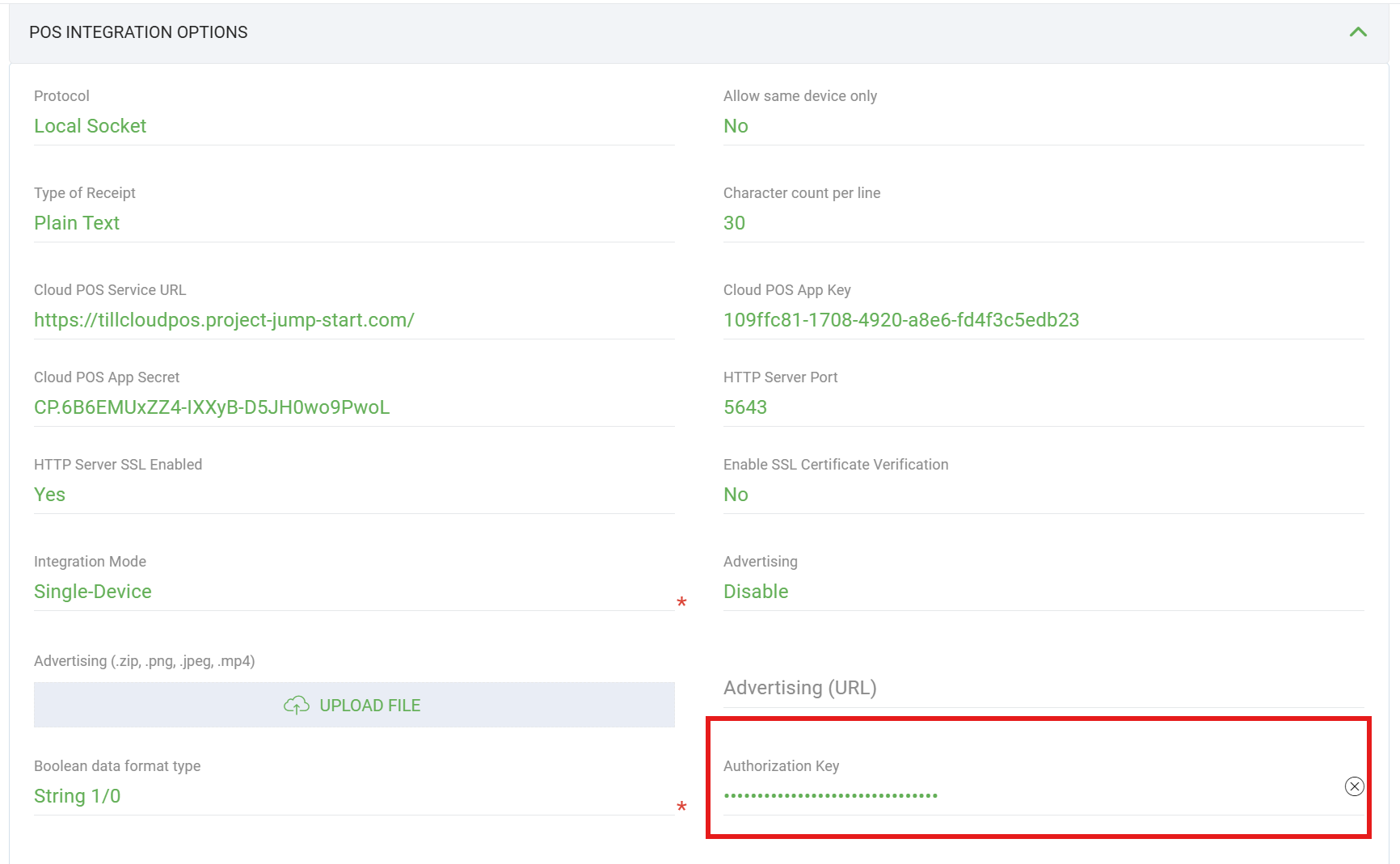
X-API-KEY request header when authorization is enabled. Sample key: 6B9F2A81D3E47C5A0B1F9E8D7C6B5A43.
These headers apply to every API call in this document. They are not repeated in each endpoint example.
| Header | Value | Required | Description |
|---|---|---|---|
| Content-Type | application/json | M | Must be set for all POST requests with a JSON body. |
| X-API-KEY | string(32) | O | Authorization key configured in TMS (maximum 32 characters). Any client-generated format is accepted if it matches the TMS value. Sample: 6B9F2A81D3E47C5A0B1F9E8D7C6B5A43. Required only when TMS authorization is enabled. |
Here are the transaction types for each function type used in the URL request path:
| Function Type | HTTP Method | Transaction Type |
|---|---|---|
| Get Merchant List | GET / POST | merchantlist |
| Get Allowed Transactions | POST | getAllowedTransactions |
| Purchase | POST | transaction |
| Purchase Cash | POST | transaction |
| Cash Only | POST | transaction |
| Refund Amount | POST | transaction |
| MOTO Purchase | POST | transaction |
| MOTO Refund Amount | POST | transaction |
| Pre-auth | POST | transaction |
| Pre-auth Complete | POST | transaction |
| Pre-auth Increment | POST | transaction |
| Pre-auth Delayed | POST | transaction |
| Reprint | POST | reprint |
| Card Verification | POST | querycard |
| Card Enquiry (unattended only) | POST | cardenquiry |
| Scan Code (unattended only) | POST | scancode |
| Settlement Enquiry | POST | settlement |
| Settlement Cutover | POST | settlement |
| Manual Host Logon | POST | logon |
| Search Transaction | POST | transactionsearch |
| Cancel Transaction | GET / POST | canceltransaction |
| Health Check | GET | healthcheck |
| Bring App To Foreground | POST | bringapptoforeground |
| Query Transaction | GET | querytransaction |
| Query Stored Transaction | POST | querystoredtransaction |
| Approve Signature | POST | approvesignature |
| Extended Pre-Auth | POST | transaction |
| Pre-Auth Reversal | POST | transaction |
| Shift Totals | POST | shiftTotals |
| Voucher Entry | POST | voucherEntry |
API Responses
Every endpoint returns a JSON body with the same top-level shape. HTTP status and business outcome are separate: a 200 OK can still contain a declined transaction, and a non-2xx response uses the same envelope with error fields in Response. This section describes the shared wrapper and the three response types the API returns.
All responses use this wrapper. Endpoint-specific fields live inside Response.
| Property | Type | M/O | Description |
|---|---|---|---|
| SessionId | string(36) | M | Echo of the sessionId from the request URI. |
| ResponseType | string | M | Identifies the operation that produced this response (e.g. "transaction", "logon", "merchantlist"). Matches the endpoint function — see API Requests → Request Types. |
| Response | object | M | Payload object. Shape depends on ResponseType and outcome — see sections below and each endpoint page. |
Boolean encoding rules are documented in Boolean Type. Use that setting when interpreting Success values in this section.
After parsing the envelope, use the fields inside Response to decide which path applies:
Response.ErrMessageis present → API error / exception (HTTP is non-2xx). ReadErrMessage,Suggestion, andStatusCode. There is noSuccessfield on this path.Response.SuccessorResponse.Transaction.Successis present → business outcome (HTTP is200). Approved/completed vs declined/failed depends on the terminal's boolean encoding ("1"/"0"ortrue/false); readResponseTexton failure/decline.- Neither applies (e.g.
merchantlist) → data payload only; HTTP200means the call succeeded.
The terminal sets the HTTP status on the wire. Response.StatusCode in the JSON body is the same value as a string (e.g. HTTP 403 → "StatusCode": "403").
| HTTP | When | JSON Response shape |
|---|---|---|
| 200 | Request accepted; operation finished or data returned | Business fields — Success, ResponseText, Transaction, etc. |
| 400 | Invalid request data, bad TxnType, amount validation, malformed body | ErrMessage, StatusCode: "400" |
| 401 | X-API-KEY missing or incorrect (when TMS authorization is enabled) | ErrMessage, StatusCode: "401" |
| 403 | Terminal not ready — logon required, merchant not ready, terminal busy, feature not supported | ErrMessage, StatusCode: "403", often Suggestion |
| 500 | Internal server error | May have no JSON body; some async operations defer the response until processing completes |
HTTP status
- 200 — operation completed or data returned; check
Successfor approval vs decline. - 400 / 401 / 403 — request rejected before processing; read
Response.ErrMessageandSuggestion. - No response — connection failure or timeout; terminal app may be unreachable.
Business fields (HTTP 200)
Response.Success— true = success, false = failure (encoding per Boolean Type); readResponseTexton failure.Response.Transaction.Success— same rule on transaction endpoints.- Async mode — poll
Status/StatusText; see Sync vs Async. - Sync mode — the HTTP connection stays open until the terminal finishes and returns the full body.
1. Success (HTTP 200)
The operation completed. Where Success is present and true, result fields are populated. ResponseType matches the endpoint called (e.g. "transaction").
{
  "SessionId": "{{sessionId}}",
  "ResponseType": "transaction",
  "Response": {
    "Transaction": {
      "TxnType": "P",
      "Success": "1",
      "lAmount": 100,
      "lszApprovalCode": "327710",
      "szAuthorizationResponseCode": "00"
    }
  }
}
2. Business failure (HTTP 200)
The terminal processed the request but the operation did not succeed (declined card, user cancel, host decline, etc.). HTTP status is still 200 — this is not an API error. Check Success is false and read ResponseText (or Transaction.ResponseText). Do not use ErrMessage on this path.
{
  "SessionId": "{{sessionId}}",
  "ResponseType": "transaction",
  "Response": {
    "Transaction": {
      "TxnType": "P",
      "Success": "0",
      "ResponseText": "Transaction Cancelled"
    }
  }
}
3. Error / exception (HTTP 400 / 401 / 403)
The request was rejected before or instead of normal processing — invalid data, bad API key, terminal not logged on, merchant not ready, or terminal busy. The envelope is unchanged; ResponseType matches the endpoint called (e.g. "transaction" for POST .../transaction). Response contains ErrMessage, StatusCode, and optionally Suggestion — never Success or ResponseText.
| Property | Type | M/O | Description |
|---|---|---|---|
| SessionId | string(36) | M | SessionId of the request transaction. |
| ResponseType | string(23) | M | Endpoint that was called (e.g. "transaction", "settlement", "logon"). |
| Response.ErrMessage | string | O | Error message — display to the operator. |
| Response.Suggestion | string | O | Recommended next action (e.g. perform manual logon). Populated for merchant-validation failures. |
| Response.StatusCode | string | O | Same value as the HTTP status, as a string (e.g. "403"). |
{
  "SessionId": "2174267867",
  "ResponseType": "transaction",
  "Response": {
    "ErrMessage": "00986211 requires to Logon",
    "Suggestion": "Check your connection and process a Manual Logon to continue",
    "StatusCode": "403"
  }
}
Common error cases (HTTP 403 unless noted):
- Logon required — merchant validation failed because the terminal is not logged on.
ErrMessageandSuggestioncome from the terminal. Call Manual Host Logon, then retry. - Merchant not ready — selected merchant cannot accept transactions. Check
Modevia Get Merchant List — see Table ENUM-10. - Terminal busy — another operation is in progress, or auto-logon is running.
- Invalid API key (401) —
X-API-KEYheader missing or wrong when TMS authorization is enabled. - Invalid request (400) — malformed JSON, invalid
TxnType, or failed field validation.
Quick reference
| Case | HTTP | Check |
|---|---|---|
| Approved transaction | 200 | Response.Transaction.Success = true |
| Declined transaction | 200 | Success = false; read ResponseText |
| Operation succeeded | 200 | Response.Success = true |
| Operation failed | 200 | Response.Success = false; read ResponseText |
| Logon / merchant not ready | 403 | ErrMessage, Suggestion, StatusCode: "403" |
| Terminal busy | 403 | ErrMessage, StatusCode: "403" |
| Invalid API key | 401 | ErrMessage, StatusCode: "401" |
| Invalid request | 400 | ErrMessage, StatusCode: "400" |
| Terminal unreachable | — | No HTTP response; use Health Check |
Boolean Type
Boolean-like values are controlled by a TMS configuration.
The terminal uses one of two encodings for request and response bodies:
- String mode —
"1"/"0"(yes/no, enabled/disabled, approved/declined) - JSON boolean mode —
true/false
Integrators must use the encoding that matches the terminal's TMS setting. Do not mix formats in a single request. Applies to Success, AsyncMode, WithReceiptImageData, and DisablePrinting (transaction, card status, settlement, offline transmission), transaction flag fields (fAuthorized, fOffline, etc.), and other boolean switches documented on each endpoint.
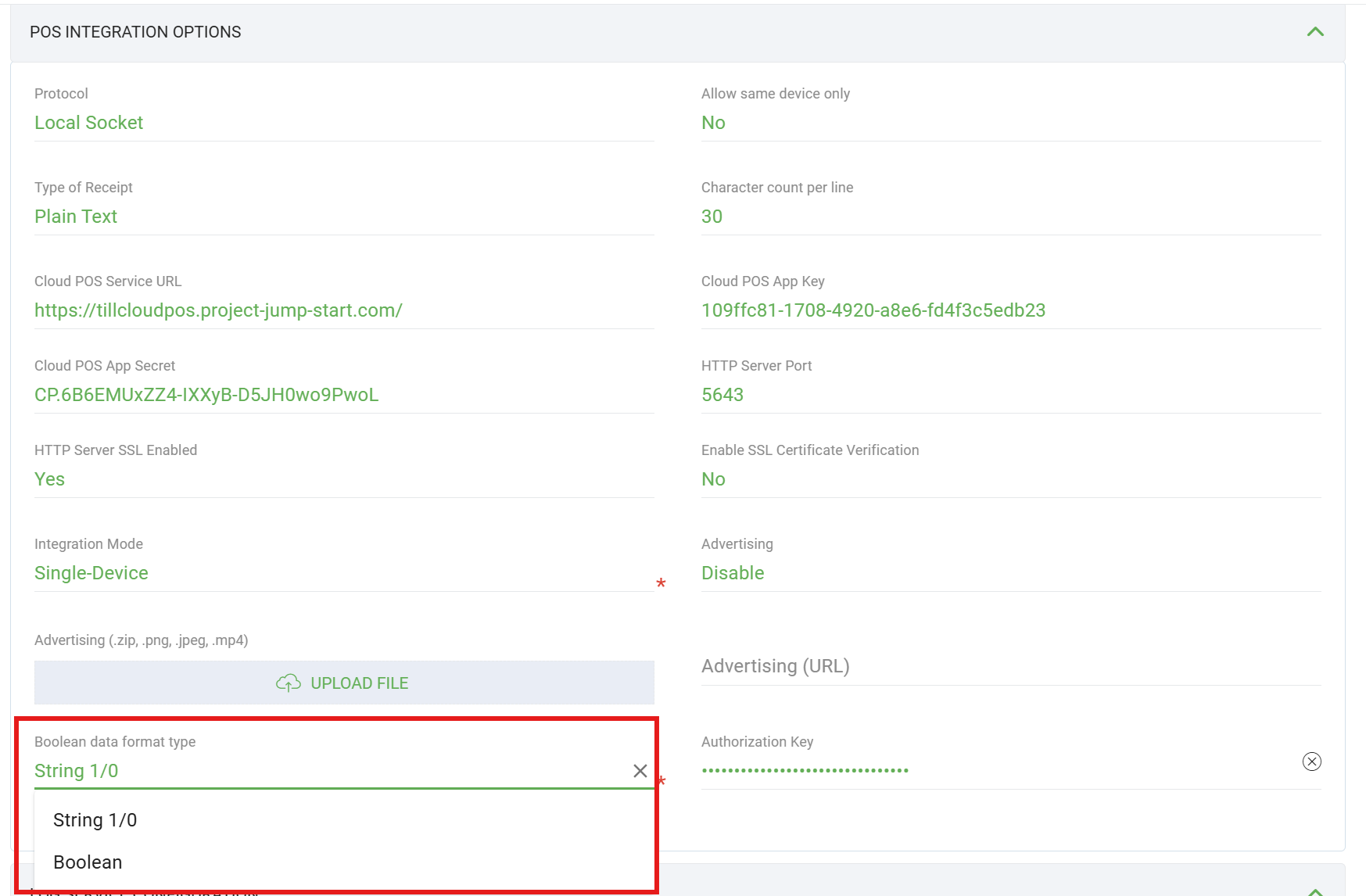
"1"/"0" encoding or Boolean for true/false encoding in request and response bodies.
JSON examples in this document may show one encoding (string or boolean) for illustration; always match the terminal TMS setting in live integrations.
Build a Server Validation Handler
When the terminal's HTTP server uses TLS, the POS client connects over https:// instead of http://. A custom server validation handler and ca.pem CA certificate are required only when HTTP Server SSL Enabled is set to Yes in TMS (POS Integration Options). If SSL is disabled (No), use plain HTTP to the configured port — no CA file or TLS handler is needed.
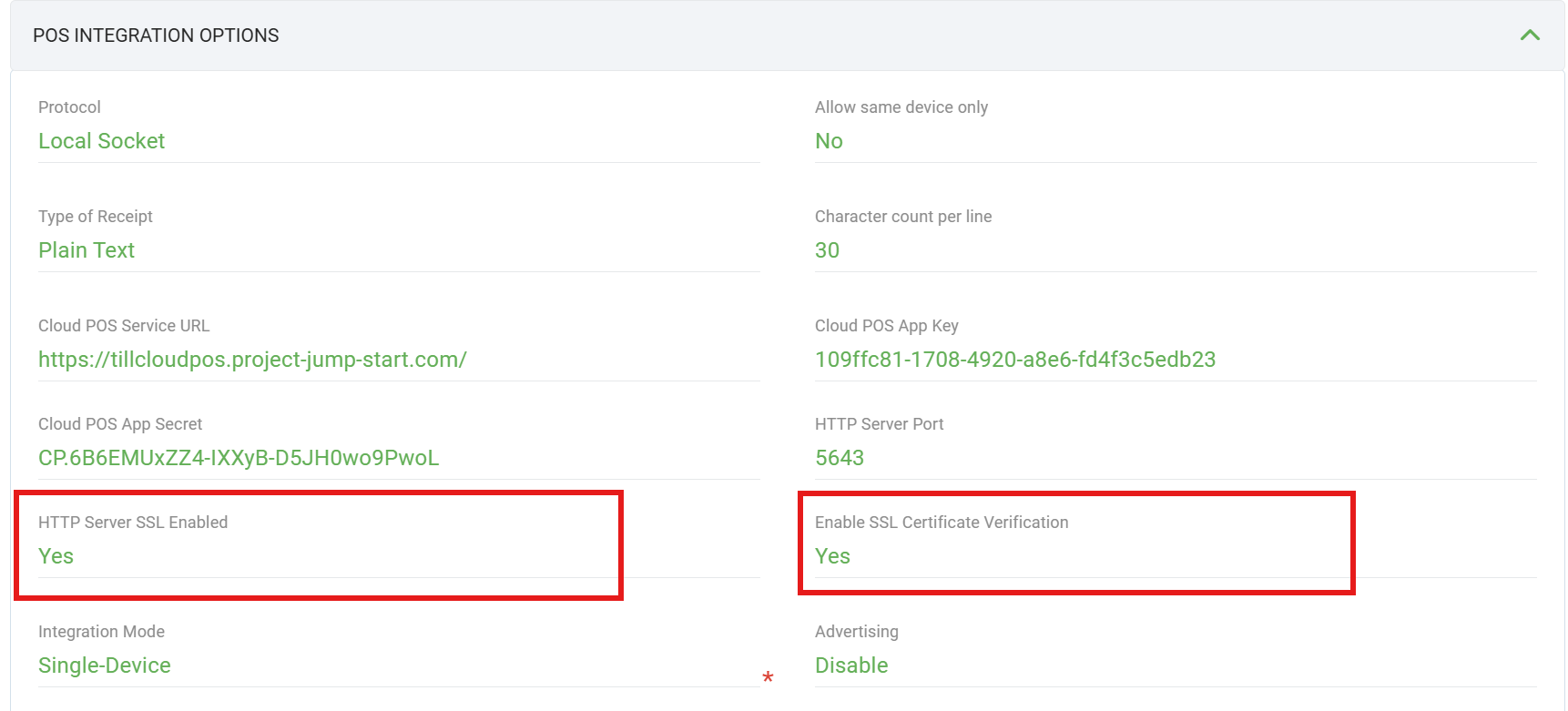
When SSL is enabled, building a server validation handler ensures the client trusts the payment terminal by validating its certificate against a specific CA (Certificate Authority). This is typically required when:
- A private CA signs the server's certificate.
- Custom validation rules are required beyond default system certificate validation.
- The handler replaces or supplements the system's default trusted Certificate Authorities with your custom CA.
Apply the following only when HTTP Server SSL Enabled = Yes:
- Store the provided
ca.pemfile in a secure and accessible location for the client. - Confirm the client can read and use the
ca.pemfile for validation.
When SSL is enabled on the terminal, follow these steps on the POS client:
Step 1 — Store the CA certificate
Save the ca.pem file in a secure location accessible by the client.
Step 2 — Implement the custom handler
Create a function or method that:
- Reads the
ca.pemfile to load the CA certificate. - Configures a validation callback that reads the server's certificate chain during a TLS handshake.
- Validates the server certificate against the loaded CA (ensure
ca.pemmatches the CA used to sign the server certificate). - Returns an object or structure for secure connections (e.g. HTTP clients).
Step 3 — Use the handler in connections
Use the custom handler when establishing HTTPS connections to the terminal so the server certificate is validated against your CA.
Get Merchant List
Retrieves the list of configured merchants from the terminal. This request has no request body — all parameters are passed via headers only.
| Property | Type | M/O | Description |
|---|---|---|---|
| SessionId | string(36) | M | SessionId of the request transaction. |
| ResponseType | string | M | Always "merchantlist". |
| Merchants | array | M | Array of merchant objects, each containing Id, Name, and Mode. |
| Id | string(2) | M | Merchant identifier. |
| Name | string | M | Merchant display name. |
| Mode | string | M | Merchant mode. Some possible values are mentioned in Table ENUM-10. |
Enum table — colocated with Get Merchant List. Also in Table Index.
Here are some values for the Mode field.
| Value of "Mode" field |
|---|
| None |
| LogOff |
| EOV |
| Online |
| RKIFail |
{
  "SessionId": "{{sessionId}}",
  "ResponseType": "merchantlist",
  "Response": {
    "Merchants": [
      {
        "Id": "1",
        "Name": "Main Merchant",
        "Mode": "Online"
      },
      {
        "Id": "2",
        "Name": "Second Merchant",
        "Mode": "LogOff"
      }
    ]
  }
}
Get Allowed Transactions
Returns the transaction types enabled for a merchant on this terminal (purchase, refund, pre-auth, etc.). Use this to build dynamic menus or validate TxnType before calling transaction.
| Field Name | Type (Max Length) | M/O | Description |
|---|---|---|---|
| Merchant | string(2) | M | Merchant to query. See Table REQ-01. |
| Field Name | Type (Max Length) | M/O | Description |
|---|---|---|---|
| SessionId | string(36) | M | SessionId of the request. |
| ResponseType | string | M | Always "getAllowedTransactions". |
| Merchant | string(2) | M | Echo of the requested merchant. |
| FunctionItems | array | M | List of allowed function entries for this merchant. |
| Id | int | M | Function identifier (on each FunctionItems element). |
| ParentId | int | M | Parent function identifier (on each FunctionItems element). |
{
  "Merchant": "01"
}{
"SessionId": "{{sessionId}}",
"ResponseType": "getAllowedTransactions",
"Response": {
"Merchant": "01",
"FunctionItems": [
{ "Id": 1, "ParentId": 0 },
{ "Id": 42, "ParentId": 1 }
]
}
}Health Check
Verifies that the terminal's payment app server is alive and reachable. The POS can send this request in parallel with active transactions without interference.
A successful response returns HTTP 200. No response (connection refused/timeout) indicates the server is down.
HTTP 200 OK
(empty body — server is alive)
Bring App To Foreground
This function allows moving the POS app to the foreground if the application is in the background.
The request to bring the application to the foreground uses the POST method and does not require a request body to perform this function.
Below is a list of fields that will appear in the 'Bring Application to Foreground' response. Fields labeled with 'M' (Mandatory) are those that will appear when the request is either successful or failed.
| Field Name | Type (Max Length) | M/O | Description |
|---|---|---|---|
| SessionId | string(36) | M | SessionId of the request transaction. |
| ResponseType | string(23) | M | ResponseType is the TransactionType of the requested transaction ("bringapptoforeground"). |
| Success | bool | M | Whether the operation succeeded (true) or failed (false). |
| ResponseText | string | O | Text of Response. Commonly occurs when a transaction is declined. |
{
  "SessionId": "{{sessionId}}",
  "ResponseType": "bringapptoforeground",
  "Response": {
    "Success": "1",
    "ResponseText": "Application brought to the foreground"
  }
}
{
"SessionId": "{{sessionId}}",
"ResponseType": "bringapptoforeground",
"Response": {
"Success": "0",
"ResponseText": "Application is not allowed to bring itself to the foreground"
}
}Transaction
All financial transaction types use POST /v1/sessions/{{sessionId}}/transaction with the same request and response structure. Set TxnType to identify the operation — see subsections below (Purchase, Refund, Pre-auth, etc.).
Fields marked with M (Mandatory) must be assigned values. The Amount must be greater than 0 where applicable. Numbered lookup tables are grouped under Request field logic, Response field logic, and Field Enums — or use the Table Index.
Common Request Fields
| Field Name | Type (Max Length) | M/O | Description |
|---|---|---|---|
| Merchant | string(2) | O | Specify the merchant to execute the transaction. See Table REQ-01. |
| TxnType | string(3) | M | Type of transaction — value depends on operation (see subsections). |
| Amount | long | O | Transaction amount in cents. Required and greater than 0 for amount-based transaction types; optional for Extended Pre-Auth (PE). |
| TxnRef | string(64) | O | Reference number attached to the transaction. Appears on the receipt. |
| OrderID | string(52) | O | Order identifier for later lookup via Query Stored Transaction. |
| EnableTip | bool | O | Whether tip entry is offered. Default disabled. |
| AmtTip | long | O | AmtTip of the sale in cents. |
| AsyncMode | bool | O | Default disabled. Set enabled for async mode — see Sync vs Async. |
| WithReceiptImageData | bool | O | If enabled, response includes ReceiptData and DigitalSig in base64 format. |
| DisablePrinting | bool | O | If enabled, disable receipt printing for this transaction. |
| ReceiptType | int | O | Defines the receipt format. See Table REQ-02. |
| PlainTextCharPerLine | short | O | Plain-text receipt width when ReceiptType is plain text. |
| CustomerReceiptPrintOption | int | O | Defines the customer receipt printing option. See Table REQ-03. |
| MerchantReceiptPrintOption | int | O | Defines the merchant receipt printing option. See Table REQ-03. |
EnableTip behaviour
- If
AmtTip> 0, the request is sent with the Tip value regardless ofEnableTip. - If
AmtTipis 0 andEnableTipis true and the payment app allows tip, a popup prompts the user to enter a Tip value. - If the payment app is not set up to allow tip, the request proceeds without a Tip value.
Reference — Request field logic
Lookup tables for common request fields — each table is linked from the matching row in Common Request Fields. See also Table Index.
| Merchant Field Value | Single Merchant | Multi Merchant |
|---|---|---|
| Not set or invalid (null, "0", "abc", etc.) | Automatically select the default merchant | Return error – Merchant Id not found |
| Valid value (parsable to int) | Use the provided select merchant | Use the provided select merchant |
| ReceiptType Value | Description |
|---|---|
| Not set | Uses TMS default. |
| 0 | Do not return receipt data. |
| 1 | Return receipt in HTML format. |
| 2 | Return receipt in plain text format. |
| Others | Treated as 'Not Set' value. |
CustomerReceiptPrintOption / MerchantReceiptPrintOption)Defines the receipt printing behaviour for customer and merchant during a transaction.
| Print Option | Description |
|---|---|
| 0 | No Printing |
| 1 | AutoPrinting |
| 2 | Prompt Printing |
Transaction Response
Below is a list of fields in the transaction response. Single-transaction responses use Response.Transaction; list responses (e.g. Search Transaction) use Response.Transactions array. Fields labeled M appear whether the transaction is approved or declined. The response structure is identical for all transaction types.
| Field Name | Type (Max Length) | M/O | Description |
|---|---|---|---|
| SessionId | string(36) | M | SessionId of the request transaction. |
| ResponseType | string(23) | M | ResponseType is the TransactionType of the requested transaction ("transaction"). |
| Success | bool | M | Whether the transaction is approved (true) or declined (false). |
| ResponseText | string | O | Text of Response. Commonly occurs when a transaction is declined. |
| PrinterStatus | string | O | Printer state text returned by the terminal when available. |
| ReceiptType | int | M | Indicates the receipt format returned. See Table RES-01. |
| Transactions | array | M | Includes a list of approved transactions corresponding to the FuncType on the terminal. Used in list responses; single transaction responses use Transaction object instead. |
| Merchant | string(2) | O | Merchant that executed the transaction. |
| TxnType | string(9) | M | Type of transaction (matches request TxnType). |
| IdShift | uint | M | Shift's identifier. |
| IdShiftName | uint | M | Shift Name's identifier. |
| lAmount | long | M | The approved amount. |
| lTipAmount | long | M | The approved tip amount. |
| lCashOut | uint | M | The approved cash amount. |
| lCashOutFee | long | M | The cash out transaction fees. |
| lSurChargeTax | long | M | The Tax surcharge. |
| lDiscount | long | M | Discount amount of the transaction. |
| lDiscountPercent | long | M | Discount Percentage of the transaction. |
| iReward | uint | M | The transaction reward. |
| lAuthorizedTotal | long | M | The total approved amount of the transaction. |
| lDonationAmount | long | M | The total approved donation amount. |
| iEntryMode | uint | M | Entry mode. See Table ENUM-04. |
| iCardType | uint | M | Type of card. See Table ENUM-03. |
| iCurrencyCode | uint | M | The currency code. |
| fsModify | uint | M | The current status of the payment record. See Table ENUM-01. |
| iPaymentType | uint | M | The Payment Type. See Table ENUM-05. |
| iCustomerLanguage | uint | M | The Customer Language. See Table ENUM-06. |
| fClosed | short | M | If the transaction has been completed. |
| fBatchError | short | M | If the batch is error. |
| fVoided | short | M | If the transaction has been voided (Voided). |
| fRefunded | bool | M | If the transaction has been refunded (Refunded). |
| fAuthorized | bool | M | If payment record was processed to host. |
| fSignature | bool | M | If it is a signature transaction. |
| fCardHolderStatesCVVnotOnCard | bool | M | No CVV due to "No CVV On Card". |
| fCardNotPresent | bool | M | No CVV due to "CVV Not Present". |
| fCardNotPresentMail | bool | M | If the transaction can not present mail. |
| fCardNotPresentPhone | bool | M | If the transaction can not present phone. |
| fCanAdjust | bool | M | If the transaction can adjust. |
| fCanVoid | bool | M | If the transaction can be voided (Can be voided). |
| fCanPreAuthComplete | bool | M | If the transaction can preauth complete. |
| fCanVoidPreAuthComplete | bool | M | If the transaction can void preauth complete. |
| fCanGoOffline | bool | M | If the transaction allows for offline stored and forward. |
| fOffline | bool | M | Indicates whether the transaction is from an EOV (or OFFLINE) case or an ONLINE case. If fOffline is true, the transaction is from an EOV (or OFFLINE) case; otherwise, the transaction is ONLINE. |
| lszCustomerReference | string | O | Customer reference number from the payment record. |
| szReferenceNumber | string | O | Retrieval Reference Number (RRN) assigned to the transaction. This is different from lszCustomerReference, which contains the POS/customer transaction reference (TxnRef). |
| lszReferenceNumberKey | string | O | Reference number search key. |
| lszApprovalCodeKey | string | O | Approval code search key. |
| lszSequenceNumber | string | O | Sequence number from the payment record. |
| Date | string(8) | O | The Date is used for searching. Formatted as YYYYMMDD. |
| Time | string(10) | O | The Time is used for searching. Formatted as hh:mm:ss. |
| AuthorizationExpiryDate | string(8) | O | Authorization expiry date. Formatted as YYYYMMDD. |
| szAuthorizationResponseCode | string | M | The approval response code of the transaction. |
| lszApprovalCode | string | O | The approval code of the transaction. |
| lszSTAN | string | O | The Systems Trace Audit Number of the transaction. |
| TRV | string(15) | O | Transaction reference value. |
| IssuerRRN | string(15) | O | Issuer retrieval reference number. |
| szIssuerId | string | O | Issuer identifier. |
| szCardHolderName | string | O | Cardholder name. |
| szStreet | string | O | Cardholder street address (MOTO). |
| szApartment | string | O | Cardholder apartment (MOTO). |
| szZipCode | string | O | Cardholder postal code (MOTO). |
| iReversalReason | uint | M | The reason for reversal. See Table ENUM-07. |
| szProcessedLaterNumber | string | O | Processed-later reference number when applicable. |
| lszCardLogo | string | M | Card Logo. |
| szQRCode | string | O | The URL address storing the transaction receipt. |
| byPinType | byte | M | Pin Type. See Table ENUM-08. |
| byPinStatus | byte | M | Pin Status. See Table ENUM-09. |
| iNoCVVOption | uint | M | The reason of the no CVV. |
| byCDCVM | byte | M | The cvm value of card. |
| iAccountType | uint | M | The account type of transaction. See Table ENUM-02. |
| lszEndCardNumber | string | O | The last four digits of the card number used to perform this transaction. |
| szMaskedCardNumber | string | O | Masked card number returned when available. |
| szCardType | string(34) | O | Card type description string from the presented card (e.g. "Mastercard"). |
| lServiceFees | long | O | The surcharge fee for the transaction. Only shown when it has a value. |
| lFee | long | O | The fee for the transaction. Only shown when it has a value. |
| PID | uint | O | ID of payment. |
| ReceiptData | string | O | Contains the receipt data of the transaction. |
| ReceiptLogo | string | O | Contains the logo to be printed on the receipt. |
| DigitalSig | string | O | Contains the digital signature data to be printed on the receipt. |
Reference — Response field logic
Lookup tables for response fields — linked from Transaction Response and reused by Search and Card Verification responses.
| ReceiptType Value | Description |
|---|---|
| 0 | Do not return receipt data. |
| 1 | Return receipt in HTML format. |
| 2 | Return receipt in plain text format. |
Reference — Field Enums
Enum value tables for transaction response fields. Each table is linked from the matching row in Transaction Response. Jump: ENUM-01 · ENUM-02 · ENUM-03 · ENUM-04 · ENUM-05 · ENUM-06 · ENUM-07 · ENUM-08 · ENUM-09
fsModify field values| Value of "fsModify" field |
|---|
| PAYMENT_MODIFY_ADJUST = 0x00000001 |
| PAYMENT_MODIFY_VOID = 0x00000002 |
| PAYMENT_MODIFY_PARTIALVOID = 0x00000004 |
| PAYMENT_MODIFY_REVERSED = 0x00000008 |
| PAYMENT_MODIFY_STOREFORWARD = 0x00000010 |
| PAYMENT_MODIFY_PENDING = 0x00000020 |
| PAYMENT_MODIFY_OFFLINE = 0x00000100 |
| PAYMENT_MODIFY_PARTIALPREAUTHCOMPLETE = 0x00000200 |
| PAYMENT_MODIFY_PREAUTHCOMPLETE = 0x00000400 |
| PAYMENT_MODIFY_DELAYEDPREAUTHCOMPLETE = 0x00000800 |
| PAYMENT_MODIFY_EOV = 0x00001000 |
| PAYMENT_MODIFY_PENDING_CANCELFAIL = 0x00002000 |
| PAYMENT_MODIFY_EMV_ERROR = 0x40000000 |
| PAYMENT_MODIFY_CANCELLED = 0x80000000 |
iAccountType field values| Value of "AccountType" field |
|---|
| ACCOUNT_TYPE_SAVINGS = "0" |
| ACCOUNT_TYPE_CHEQUE = "1" |
| ACCOUNT_TYPE_CREDIT = "2" |
iCardType field valuesHere are some values for the iCardType field.
| CardType | CardType |
|---|---|
| CARD_NONE = 0 | CARD_UNIONPAY = 75 |
| CARD_DEBIT = 1 | CARD_TROY = 76 |
| CARD_VISADEBIT = 2 | CARD_SPARE1 = 77 |
| CARD_DEBITMASTER = 3 | CARD_SPARE2 = 78 |
| CARD_AMEXDEBIT = 4 | CARD_SPARE3 = 79 |
| CARD_JCBDEBIT = 5 | CARD_SPARE4 = 80 |
| CARD_DISCOVERDEBIT = 6 | CARD_SPARE5 = 81 |
| CARD_UNIONPAYDEBIT = 7 | CARD_SPARE6 = 82 |
| CARD_INTERACTDEBIT = 8 | CARD_SPARE7 = 83 |
| CARD_MAESTRODEBIT = 9 | CARD_SPARE8 = 84 |
| CARD_TROYDEBIT = 10 | CARD_SPARE9 = 85 |
| CARD_SPAREDEBIT1 = 11 | CARD_SPARE10 = 86 |
| CARD_SPAREDEBIT2 = 12 | CARD_SPARE11 = 87 |
| CARD_SPAREDEBIT3 = 13 | CARD_SPARE12 = 88 |
| CARD_SPAREDEBIT4 = 14 | CARD_SPARE13 = 89 |
| CARD_SPAREDEBIT5 = 15 | CARD_SPARE14 = 90 |
| CARD_SPAREDEBIT6 = 16 | CARD_SPARE15 = 91 |
| CARD_SPAREDEBIT7 = 17 | CARD_SPARE16 = 92 |
| CARD_SPAREDEBIT8 = 18 | CARD_SPARE17 = 93 |
| CARD_SPAREDEBIT9 = 19 | CARD_SPARE18 = 94 |
| CARD_SPAREDEBIT10 = 20 | CARD_SPARE19 = 95 |
| CARD_ALLIEDPDEBIT = 21 | CARD_SPARE20 = 96 |
| CARD_ARBUCKLEDEBIT = 22 | CARD_ALLIEDP = 97 |
| CARD_ASBPRVLBDEBIT = 23 | CARD_ARBUCKLE = 98 |
| CARD_ATSDEBIT = 24 | CARD_ASBPRVLB = 99 |
| CARD_BABYCITYDEBIT = 25 | CARD_ATS = 100 |
| CARD_BARTRCRDDEBIT = 26 | CARD_BABYCITY = 101 |
| CARD_CASHRWDSDEBIT = 27 | CARD_BARTRCRD = 102 |
| CARD_CRTDEBIT = 28 | CARD_CASHRWDS = 103 |
| CARD_CSLDEBIT = 29 | CARD_CRT = 104 |
| CARD_DRIVEDEBIT = 30 | CARD_CSL = 105 |
| CARD_EAZYCDDEBIT = 31 | CARD_DRIVE = 106 |
| CARD_ECARDDEBIT = 32 | CARD_EAZYCD = 107 |
| CARD_ECARDZGDEBIT = 33 | CARD_ECARD = 108 |
| CARD_ECARDZLDEBIT = 34 | CARD_ECARDZG = 109 |
| CARD_ECOM1DEBIT = 35 | CARD_ECARDZL = 110 |
| CARD_EFTPOSDEBIT = 36 | CARD_ECOM1 = 111 |
| CARD_ELOYALTYDEBIT = 37 | CARD_EFTPOS = 112 |
| CARD_EZIPAYDEBIT = 38 | CARD_ELOYALTY = 113 |
| CARD_FFCARDDEBIT = 39 | CARD_EZIPAY = 114 |
| CARD_FLEETDEBIT = 40 | CARD_FFCARD = 115 |
| CARD_FLYBUYDEBIT = 41 | CARD_FLEET = 116 |
| CARD_FPFGIFTDEBIT = 42 | CARD_FLYBUY = 117 |
| CARD_GENIEDEBIT = 43 | CARD_FPFGIFT = 118 |
| CARD_GIFTSTNDEBIT = 44 | CARD_GENIE = 119 |
| CARD_INDUEDEBIT = 45 | CARD_GIFTSTN = 120 |
| CARD_INSIGHTDEBIT = 46 | CARD_INDUE = 121 |
| CARD_LOYALTYDEBIT = 47 | CARD_INSIGHT = 122 |
| CARD_MOBILDEBIT = 48 | CARD_MOBIL = 123 |
| CARD_MTAGIFTDEBIT = 49 | CARD_MTAGIFT = 124 |
| CARD_NPDDEBIT = 50 | CARD_NPD = 125 |
| CARD_ONECARDDEBIT = 51 | CARD_ONECARD = 126 |
| CARD_POSTIEDEBIT = 52 | CARD_POSTIE = 127 |
| CARD_QCARDDEBIT = 53 | CARD_QCARD = 128 |
| CARD_RD1DEBIT = 54 | CARD_RD1 = 129 |
| CARD_ROCKGASDEBIT = 55 | CARD_ROCKGAS = 130 |
| CARD_STARCARDDEBIT = 56 | CARD_STARCARD = 131 |
| CARD_SWIPEGFTDEBIT = 57 | CARD_SWIPEGFT = 132 |
| CARD_SWIPELOYDEBIT = 58 | CARD_SWIPELOY = 133 |
| CARD_TRUREWRDDEBIT = 59 | CARD_TRUREWRD = 134 |
| CARD_TTCRDSDEBIT = 60 | CARD_TTCRDS = 135 |
| CARD_TTLSTOREDEBIT = 61 | CARD_TTLSTORE = 136 |
| CARD_VIIDEBIT = 62 | CARD_VII = 137 |
| CARD_WAPDEBIT = 63 | CARD_WAP = 138 |
| CARD_WESTFLDDEBIT = 64 | CARD_WESTFLD = 139 |
| CARD_WPGDEBIT = 65 | CARD_WPG = 140 |
| CARD_ZBIZDEBIT = 66 | CARD_ZBIZ = 141 |
| CARD_ZCARDDEBIT = 67 | CARD_ZCARD = 142 |
| CARD_CREDIT = 68 | CARD_GIFT = 143 |
| CARD_VISA = 69 | CARD_LOYALTY = 144 |
| CARD_MASTER = 70 | CARD_CASH = 145 |
| CARD_AMEX = 71 | CARD_CHEQUE = 146 |
| CARD_JCB = 72 | CARD_EBTASSIST = 147 |
| CARD_DINERS = 73 | CARD_EBTSNAP = 148 |
| CARD_DISCOVER = 74 | AllCards = 149 |
| CARD_UNKNOWN = 150 | CARD_ZBIZTESTDEBIT = 151 |
| CARD_ZBIZTEST = 152 | |
EntryMode / iEntryMode field valuesUsed in Transaction Response (iEntryMode) and Card Verification response (EntryMode).
| Value | Name |
|---|---|
| 0 | EM_NONE |
| 1 | EM_POS |
| 2 | EM_IMPRINT |
| 3 | EM_MOTO |
| 4 | EM_SWIPED |
| 5 | EM_MANUAL |
| 6 | EM_RFID |
| 7 | EM_CONTACTLESS_ISO |
| 8 | EM_CONTACTLESS_MAGSTRIPE |
| 9 | EM_CONTACTLESS_DOMESTIC |
| 10 | EM_CONTACTLESS_NFC |
| 11 | EM_CONTACTLESS_VAS |
| 12 | EM_SMC |
| 13 | EM_ALIPAY |
| 14 | EM_WECHAT |
| 15 | EM_END |
| 16 | EM_ECOMMERCE |
| 17 | EM_CENTRAPAY |
| 18 | EM_GIFT_REDEEM |
| 19 | EM_DIRECTPAY |
iPaymentType field values| Payment Type | Payment Type |
|---|---|
| PAYMENT_TYPE_SALE = 0 | PAYMENT_TYPE_PREAUTHTOPUP = 12 |
| PAYMENT_TYPE_REFUND = 1 | PAYMENT_TYPE_PREAUTHDELAY = 13 |
| PAYMENT_TYPE_CASHADVANCE = 2 | PAYMENT_TYPE_PREAUTHPARTIAL = 14 |
| PAYMENT_TYPE_PREAUTH = 3 | PAYMENT_TYPE_PREAUTHCANCEL = 15 |
| PAYMENT_TYPE_PREAUTHCOMPLETE = 4 | PAYMENT_TYPE_IMPRINTER = 20 |
| PAYMENT_TYPE_BALANCEINQUIRY = 5 | PAYMENT_TYPE_AUTHONLY = 60 |
| PAYMENT_TYPE_DEPOSIT = 6 | PAYMENT_TYPE_REGISTER = 100 |
| PAYMENT_TYPE_SETTLE = 7 | PAYMENT_TYPE_ACTIVATE = 101 |
| PAYMENT_TYPE_INSTALLMENTSALE = 10 | PAYMENT_TYPE_DEACTIVATE = 102 |
| PAYMENT_TYPE_LATEINTERESTINSTALLMENTSALE = 11 | PAYMENT_TYPE_RELOAD = 103 |
| PAYMENT_TYPE_REDEEMED = 104 | |
iCustomerLanguage field valuesLocale code → language name → numeric value (payment app locale catalog; default supported locale is en_US = 1).
| Locale | Language | Value |
|---|---|---|
| en_US | English (US) | 1 |
| de_DE | German (Germany) | 2 |
| zh_CN | Chinese (PRC) | 3 |
| zh_TW | Chinese (Taiwan) | 4 |
| cs_CZ | Czech (Czech Republic) | 5 |
| nl_BE | Dutch (Netherlands) | 6 |
| en_AU | English (Australia) | 7 |
| en_GB | English (Britain) | 8 |
| en_CA | English (Canada) | 9 |
| en_NZ | English (New Zealand) | 10 |
| en_SG | English (Singapore) | 11 |
| fr_BE | French (Belgium) | 12 |
| fr_CA | French (Canada) | 13 |
| fr_FR | French (France) | 14 |
| fr_CH | French (Switzerland) | 15 |
| de_AT | German (Austria) | 16 |
| de_LI | German (Liechtenstein) | 17 |
| de_CH | German (Switzerland) | 18 |
| it_IT | Italian (Italy) | 19 |
| it_CH | Italian (Switzerland) | 20 |
| ja_JP | Japanese (Japan) | 21 |
| ko_KR | Korean (Korea) | 22 |
| pl_PL | Polish (Poland) | 23 |
| ru_RU | Russian (Russia) | 24 |
| es_ES | Spanish (Spain) | 25 |
| ar_EG | Arabic (Egypt) | 26 |
| ar_IL | Arabic (Israel) | 27 |
| bg_BG | Bulgarian (Bulgaria) | 28 |
| ca_ES | Catalan (Spain) | 29 |
| hr_HR | Croatian (Croatia) | 30 |
| da_DK | Danish (Denmark) | 31 |
| en_IN | English (India) | 32 |
| fi_FI | Finnish (Finland) | 33 |
| en_IE | English (Ireland) | 34 |
| en_ZA | English (South Africa) | 35 |
| el_GR | Greek (Greece) | 36 |
| iw_IL | Hebrew (Israel) | 37 |
| hi_IN | Hindi (India) | 38 |
| hu_HU | Hungarian (Hungary) | 39 |
| in_ID | Indonesian (Indonesia) | 40 |
| lt_LT | Lithuanian (Lithuania) | 41 |
| lv_LV | Latvian (Latvia) | 42 |
| nb_NO | Norwegian-Bokmol (Norway) | 43 |
| pt_BR | Portuguese (Brazil) | 44 |
| sr_RS | Serbian (Cyrillic,Serbia) | 45 |
| sk_SK | Slovak (Slovakia) | 46 |
| sl_SI | Slovenian (Slovenia) | 47 |
| es_US | Spanish (US) | 48 |
iReversalReason field values| Value |
|---|
| AUTO_REVERSAL_POWERFAILURE = 1 |
| AUTO_REVERSAL_SIGNATURE = 2 |
| AUTO_REVERSAL_NETWORK = 3 |
| AUTO_REVERSAL_MACVALIDATION = 4 |
| AUTO_REVERSAL_MESSAGEVALIDATION = 5 |
| AUTO_REVERSAL_INVALIDRESPONSECODE = 6 |
| AUTO_REVERSAL_POWERLINKFAILURE = 7 |
| AUTO_REVERSAL_TRANSACTIONVOID = 8 |
| AUTO_REVERSAL_INTERNALDEVICEFAILURE = 9 |
| AUTO_REVERSAL_CARDREMOVED = 10 |
| AUTO_REVERSAL_CARDDECLINED = 11 |
byPinType field values| Value |
|---|
| PIN_TYPE_NO_PIN = 0 |
| PIN_TYPE_ONLINE = 1 |
| PIN_TYPE_OFFLINE_PLAINTEXT = 2 |
| PIN_TYPE_OFFLINE_ENCRYPTED = 3 |
byPinStatus field values| Value |
|---|
| PIN_NOT_PROMPTED = 0 |
| PIN_PROMPTED_AND_CANCELLED = 1 |
| PIN_PROMPTED_AND_TIMEDOUT = 2 |
| PIN_PROMPTED_AND_ENTERED = 3 |
| PIN_PROMPTED_AND_BYPASSED = 4 |
{
  "Merchant": "01",
  "TxnType": "P",
  "EnableTip": 1,
  "AmtTip": 100,
  "Amount": 200,
  "TxnRef": "12345567890",
  "AsyncMode": "0",
  "WithReceiptImageData": "1",
  "ReceiptType": 1
}{
"SessionId": "{{sessionId}}",
"ResponseType": "transaction",
"Response": {
"Transaction": {
"Merchant": "1",
"TxnType": "P",
"Success": "1",
"IdShift": 1,
"IdShiftName": 0,
"lAmount": 100,
"lTipAmount": 0,
"lCashOut": 0,
"lAuthorizedTotal": 100,
"iEntryMode": 7,
"iCardType": 69,
"iAccountType": 2,
"szAuthorizationResponseCode": "00",
"lszApprovalCode": "327710",
"szReferenceNumber": "000001013731",
"lszSTAN": "000018",
"lszEndCardNumber": "2955",
"fOffline": "0",
"szCardType": "Visa",
"PID": 8,
"Date": "20240404",
"Time": "15:14:02",
"ReceiptType": 1
}
}
}{
"SessionId": "{{sessionId}}",
"ResponseType": "transaction",
"Response": {
"Transaction": {
"TxnType": "P",
"Success": "0",
"ResponseText": "Transaction Cancelled",
"lAmount": 0,
"lAuthorizedTotal": 0,
"ReceiptType": 1
}
}
}Response examples apply to all transaction types. Only TxnType and populated fields differ.
Purchase TxnType: P
The purchase transaction type allows the merchant to perform a sale, it uses the transaction request format.
Also uses all common request fields. Response structure is defined in Transaction Response.
| Field Name | Type (Max Length) | M/O | Description |
|---|---|---|---|
| TxnType | string(3) | M | Must be "P" (Purchase). |
| Amount | long | M | Amount of sale in cents. Must be greater than 0. |
| EnableTip | bool | O | Indicates could Tip or not. Default '0' (Disabled Tip). See EnableTip notes. |
| AmtTip | long | O | AmtTip of the sale in cents. |
{
  "Merchant": "01",
  "TxnType": "P",
  "EnableTip": 1,
  "AmtTip": 100,
  "Amount": 200,
  "TxnRef": "12345567890",
  "AsyncMode": "0",
  "WithReceiptImageData": "1",
  "ReceiptType": 1
}
Refund Amount TxnType: R
A refund transaction type allows the merchant to refund a sale, it uses the transaction request format.
Also uses all common request fields. Response structure is defined in Transaction Response.
| Field Name | Type (Max Length) | M/O | Description |
|---|---|---|---|
| TxnType | string(3) | M | Must be "R" (Refund Amount). |
| Amount | long | M | Refund amount in cents. Must be greater than 0. |
{
  "Merchant": "01",
  "TxnType": "R",
  "Amount": 1000,
  "TxnRef": "{{txnRef}}",
  "AsyncMode": "0",
  "WithReceiptImageData": "1",
  "ReceiptType": 1
}
Cash Only TxnType: C
The cash-out transaction type allows the merchant to perform a cash-out transaction, it uses the transaction request format.
Also uses all common request fields. Response structure is defined in Transaction Response.
| Field Name | Type (Max Length) | M/O | Description |
|---|---|---|---|
| TxnType | string(3) | M | Must be "C" (Cash Only). |
| Amount | long | M | Cash amount in cents. Must be greater than 0. |
{
  "Merchant": "01",
  "TxnType": "C",
  "Amount": 10000,
  "TxnRef": "{{txnRef}}",
  "AsyncMode": "0",
  "WithReceiptImageData": "1",
  "ReceiptType": 1
}
Purchase Cash TxnType: PC
The purchase cash transaction type allows the merchant to perform a sale and also withdraw cash, it uses the transaction request format.
Also uses all common request fields. Response structure is defined in Transaction Response.
| Field Name | Type (Max Length) | M/O | Description |
|---|---|---|---|
| TxnType | string(3) | M | Must be "PC" (Purchase Cash). |
| Amount | long | M | Purchase amount in cents. Must be greater than 0. |
| AmtCash | long | M | Cash-out amount in cents. Must be greater than 0. |
{
  "Merchant": "01",
  "TxnType": "PC",
  "Amount": 1000,
  "AmtCash": 2000,
  "TxnRef": "{{txnRef}}",
  "AsyncMode": "0",
  "WithReceiptImageData": "1",
  "ReceiptType": 1
}
MOTO Purchase TxnType: MP
The moto purchase transaction type allows the merchant to perform a sale with a manually entered transaction that has been generated from a mail order or a telephone order, it uses the transaction request format.
Also uses all common request fields. Response structure is defined in Transaction Response.
| Field Name | Type (Max Length) | M/O | Description |
|---|---|---|---|
| TxnType | string(3) | M | Must be "MP" (MOTO Purchase). |
| Amount | long | M | Amount in cents. Must be greater than 0. |
| EnableTip | bool | O | Whether tip entry is offered. Default disabled. |
| AmtTip | long | O | AmtTip of the sale in cents. |
| Pan | string(20) | O | Card number. If omitted, operator enters on terminal. |
| DateExpiry | string(4) | O | Card expiry in MMYY format. |
| CVV | string(3) | O | Card CVV/CVC. |
| CardName | string(26) | O | Cardholder name. |
{
  "Merchant": "01",
  "TxnType": "MP",
  "TxnRef": "{{txnRef}}",
  "EnableTip": 1,
  "AmtTip": 200,
  "Amount": 2000,
  "Pan": "6367172100001111",
  "DateExpiry": "1249",
  "CVV": "120",
  "CardName": "Paymark Test",
  "AsyncMode": "0",
  "WithReceiptImageData": "1",
  "ReceiptType": 1
}
MOTO Refund Amount TxnType: MR
A moto refund transaction type allows the merchant to refund a sale with a manually entered transaction, it uses the transaction request format.
Also uses all common request fields. Response structure is defined in Transaction Response.
| Field Name | Type (Max Length) | M/O | Description |
|---|---|---|---|
| TxnType | string(3) | M | Must be "MR" (MOTO Refund Amount). |
| Amount | long | M | Refund amount in cents. Must be greater than 0. |
| Pan | string(20) | O | Card number. |
| DateExpiry | string(4) | O | Card expiry in MMYY. |
| CardName | string(26) | O | Cardholder name. |
| CVV | string(3) | O | Card CVV. |
{
  "Merchant": "00",
  "TxnType": "MR",
  "Amount": 100,
  "TxnRef": "{{txnRef}}",
  "Pan": "6367172100001111",
  "DateExpiry": "1249",
  "CardName": "Paymark Test",
  "AsyncMode": "0",
  "WithReceiptImageData": "1",
  "ReceiptType": 1
}
Pre-auth Family — Developer Guide
Pre-auth reserves funds on the card without capturing the final amount. Follow-up operations reference the original authorization using lszApprovalCode, RRN, and lszSTAN. Provide the original RRN and set lszSTAN to its last six characters. All pre-auth transactions use the same transaction request format and share the transaction response structure.
| Step | TxnType | What it does | Source record |
|---|---|---|---|
| 1 | PA | Authorize — reserve funds on the card. | — |
| 2a | AC | Complete — capture the final amount. | Original PA (FuncType: PreAuthInquiry) |
| 2b | PT | Increment — increase the reserved amount. | Original PA (FuncType: PreAuthInquiry) |
| 2c | PR | Reversal — reverse the open pre-auth. | Original PA (FuncType: PreAuthInquiry) |
| 2d | PE | Extended — extend the legacy pre-auth record. | Original PA (FuncType: PreAuthInquiry) |
| 3 | PD | Delayed — optional adjustment after completion when extra goods/services are delivered. | Original AC (FuncType: PreAuthCompleteInquiry) |
Linking follow-up requests
Follow-up requests (AC, PT, PD, PE, PR) require lszApprovalCode, the original RRN, and lszSTAN set to the last six characters of the original RRN.
- Option 1 — Search Transaction: Use the original
RRNand approval code asAuthIdwith the correctFuncType, then select the matching record fromResponse.Transactions[]. - Option 2 — POS-managed: Store
lszApprovalCode,lszSTAN, andszReferenceNumber(RRN) from the original transaction response, then pass them in the follow-up request.
Search Transaction ↔ Pre-auth
Use Search Transaction to list approved records on the terminal before performing a follow-up:
FuncType: "PreAuthInquiry"— look up an original pre-auth for Complete, Increment, Extended, or Reversal.FuncType: "PreAuthCompleteInquiry"— look up a completed pre-auth for Delayed.
FuncType is mandatory. For either pre-auth inquiry type, both RRN and AuthId are mandatory; AuthId must equal the original transaction's lszApprovalCode. Stan is optional; when supplied, use the last six characters of RRN.
Pre-auth TxnType: PA
A pre-auth transaction type allows the merchant to pre-auth a sale, it uses the transaction request format.
Also uses all common request fields. Response structure is defined in Transaction Response.
| Field Name | Type (Max Length) | M/O | Description |
|---|---|---|---|
| TxnType | string(3) | M | Must be "PA" (Pre-auth). |
| Amount | long | M | Pre-auth amount in cents. Must be greater than 0. |
| IsMaxAmount | bool | O | When enabled, use the maximum amount configured in MaxStore for the unattended pre-auth. |
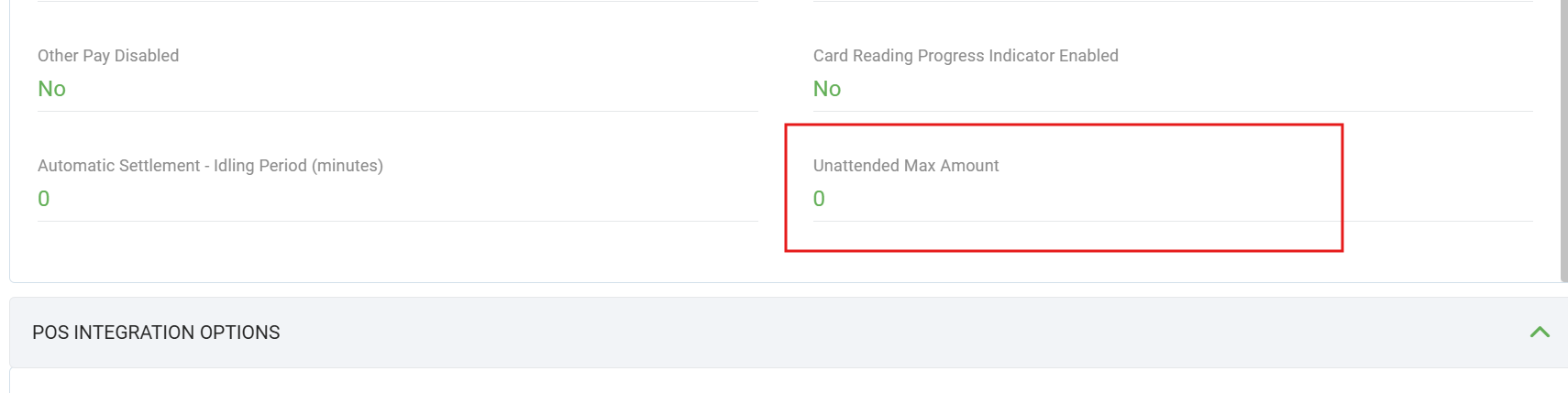
After approval
Save lszApprovalCode, lszSTAN, and szReferenceNumber (RRN) from Response.Transaction. Set lszSTAN to the last six characters of szReferenceNumber. Store these identifiers in your POS; Search Transaction uses the saved RRN and approval code (AuthId) to locate and confirm the matching record. Use PreAuthInquiry for Complete, Increment, Extended, or Reversal, and PreAuthCompleteInquiry for Delayed. See Pre-auth Guide.
{
  "Merchant": "01",
  "TxnType": "PA",
  "Amount": 1500,
  "TxnRef": "123415890",
  "AsyncMode": "0",
  "WithReceiptImageData": "1",
  "ReceiptType": 1
}
Pre-auth Complete TxnType: AC
A preauth complete transaction type allows the merchant to complete a preauth sale.
Also uses all common request fields. Response structure is defined in Transaction Response.
| Field Name | Type (Max Length) | M/O | Description |
|---|---|---|---|
| TxnType | string(3) | M | Must be "AC" (Pre-auth Complete). |
| Amount | long | M | Final charge amount in cents. Must be greater than 0. |
| RRN | string(12) | M | Original pre-auth retrieval reference. The last six characters are used as lszSTAN. |
| lszApprovalCode | string | M | Approval code from the original Pre-auth. Obtain via Search Transaction (FuncType: "PreAuthInquiry" with RRN and AuthId) or from the stored PA response. |
| lszSTAN | string | M | Last six characters of the original RRN. |
Linking to the original pre-auth
- Option 1: Search with
FuncType: "PreAuthInquiry",RRN, andAuthId; select the returned record and use itsszReferenceNumber(RRN),lszApprovalCode, andlszSTAN. - Option 2: Pass
RRN,lszApprovalCode, andlszSTANsaved from the originalPAresponse.
{
  "Merchant": "01",
  "TxnType": "AC",
  "Amount": 100,
  "RRN": "123456789012",
  "lszApprovalCode": "328958",
  "lszSTAN": "000030",
  "AsyncMode": "0",
  "WithReceiptImageData": "1",
  "ReceiptType": 1
}
Pre-auth Increment TxnType: PT
A preauth increment transaction type enables the merchant to increase the amount of a preauth sale by adding a new amount to the previous preauth.
Also uses all common request fields. Response structure is defined in Transaction Response.
| Field Name | Type (Max Length) | M/O | Description |
|---|---|---|---|
| TxnType | string(3) | M | Must be "PT" (Pre-auth Increment). |
| Amount | long | M | Additional amount in cents. Must be greater than 0. |
| RRN | string(12) | M | Original pre-auth retrieval reference. The last six characters are used as lszSTAN. |
| lszApprovalCode | string | M | Approval code from the original Pre-auth. |
| lszSTAN | string | M | Last six characters of the original RRN. |
Linking to the original pre-auth
- Option 1: Search with
FuncType: "PreAuthInquiry",RRN, andAuthId; select the returned record and use itsszReferenceNumber(RRN),lszApprovalCode, andlszSTAN. - Option 2: Pass
RRN,lszApprovalCode, andlszSTANsaved from the originalPAresponse.
{
  "Merchant": "01",
  "TxnType": "PT",
  "Amount": 100,
  "RRN": "123456789012",
  "lszApprovalCode": "328958",
  "lszSTAN": "000030",
  "AsyncMode": "0",
  "WithReceiptImageData": "1",
  "ReceiptType": 1
}
Pre-auth Delayed TxnType: PD
A preauth delayed transaction type is an optional message that may be sent when additional goods or services have been delivered after the final completion has been processed.
Also uses all common request fields. Response structure is defined in Transaction Response.
| Field Name | Type (Max Length) | M/O | Description |
|---|---|---|---|
| TxnType | string(3) | M | Must be "PD" (Pre-auth Delayed). |
| Amount | long | M | Amount in cents. Must be greater than 0. |
| RRN | string(12) | M | Original pre-auth retrieval reference. The last six characters are used as lszSTAN. |
| lszApprovalCode | string | M | Approval code from the original Pre-auth Complete (AC). |
| lszSTAN | string | M | Last six characters of the original RRN. |
Linking to the original pre-auth complete
- Option 1: Search with
FuncType: "PreAuthCompleteInquiry",RRN, andAuthId; select the returned completed pre-auth and use itsszReferenceNumber(RRN),lszApprovalCode, andlszSTAN. - Option 2: Pass
RRN,lszApprovalCode, andlszSTANsaved from the originalACresponse.
Unlike other follow-ups, Delayed references a completed pre-auth (AC), not the original authorization (PA).
{
  "Merchant": "01",
  "TxnType": "PD",
  "Amount": 100,
  "RRN": "123456789012",
  "lszApprovalCode": "328958",
  "lszSTAN": "000030",
  "AsyncMode": "0",
  "WithReceiptImageData": "1",
  "ReceiptType": 1
}
Extended Pre-Auth TxnType: PE
Extended Pre-Auth extends a legacy pre-auth record. An amount is not required for PE. The original record is identified by lszApprovalCode and RRN.
Also uses all common request fields. Response structure is defined in Transaction Response.
| Field Name | Type | M/O | Description |
|---|---|---|---|
| TxnType | string(3) | M | Must be "PE". |
| lszApprovalCode | string | M | Approval code from the original pre-auth. |
| RRN | string(12) | M | Retrieval reference number from the original pre-auth. |
| lszSTAN | string | M | Last six characters of the original RRN. |
Linking to the original pre-auth
- Option 1: Search with
FuncType: "PreAuthInquiry",RRN, andAuthId; select the returned record and use itsszReferenceNumber(RRN),lszApprovalCode, andlszSTAN. - Option 2: Pass
RRN,lszApprovalCode, andlszSTANsaved from the originalPAresponse.
{
  "Merchant": "01",
  "TxnType": "PE",
  "lszApprovalCode": "328958",
  "RRN": "123456789012",
  "lszSTAN": "789012",
  "AsyncMode": "0",
  "WithReceiptImageData": "1",
  "ReceiptType": 1
}
Pre-Auth Reversal TxnType: PR
Pre-Auth Reversal reverses an open pre-auth. Uses POST .../transaction with TxnType: "PR".
Also uses all common request fields. Response structure is defined in Transaction Response.
| Field Name | Type (Max Length) | M/O | Description |
|---|---|---|---|
| TxnType | string(3) | M | Must be "PR" (Pre-Auth Reversal). |
| Amount | long | M | Reversal amount in cents. Pass the amount for the reversal transaction. |
| RRN | string(12) | M | Retrieval reference number from the original Pre-auth. |
| lszApprovalCode | string | M | Approval code from the original Pre-auth (PA). |
| lszSTAN | string | M | Last six characters of the original RRN. |
Linking to the original pre-auth
- Option 1: Search with
FuncType: "PreAuthInquiry",RRN, andAuthId; select the returned record and use itslszApprovalCodeandszReferenceNumber(RRN). - Option 2: Pass values saved from the original
PAresponse.
{
  "Merchant": "01",
  "TxnType": "PR",
  "Amount": 1500,
  "lszApprovalCode": "328958",
  "RRN": "123456789012",
  "lszSTAN": "789012",
  "AsyncMode": "0"
}
Search Transaction
Search Transaction has two inquiry modes and one local-search mode. PreAuthInquiry and PreAuthCompleteInquiry send the supplied identifiers to the payment gateway to find the source pre-auth record; Reprint searches approved print jobs stored on the terminal. See Pre-auth Guide for how search fits into the pre-auth flow.
FuncType is mandatory for every search. RRN and AuthId are mandatory only for PreAuthInquiry and PreAuthCompleteInquiry; they are optional or not used for Reprint as shown below.
| Field Name | Type (Max Length) | M/O | Description |
|---|---|---|---|
| Merchant | string(2) | O | Specify the merchant to execute the transaction. See Table REQ-01. |
| FuncType | string(22) | M | Type of stored records to retrieve. Controls which follow-up operations the results support — see Table ENUM-11. |
| RRN | string(12) | M* | Required for PreAuthInquiry and PreAuthCompleteInquiry; optional retrieval-reference filter for Reprint. |
| TRV | string(15) | O | Optional gateway filter for PreAuthInquiry and PreAuthCompleteInquiry; not used for Reprint. |
| AuthId | string(6) | M* | Original transaction's lszApprovalCode. Required for PreAuthInquiry and PreAuthCompleteInquiry; omit for Reprint. |
| Stan | string(6) | O | Optional. Passed to the gateway for either pre-auth inquiry type; used as a database filter for Reprint. |
| Last4Digits | string(4) | O | Optional last-four-card-digits database filter for Reprint; not used for either pre-auth inquiry type. |
| Amount | long | O | Optional amount database filter in cents for Reprint; not used for either pre-auth inquiry type. |
| ExAmount | bool | O | Amount matching mode for the Reprint Amount filter; not used for either pre-auth inquiry type. |
| SearchAmount | long | O | Optional amount passed to the inquiry gateway, in cents; not used for Reprint. |
| IssuerRRN | string(15) | O | Optional issuer retrieval-reference gateway filter for either pre-auth inquiry type; not used for Reprint. |
| Field | PreAuthInquiry | PreAuthCompleteInquiry | Reprint |
|---|---|---|---|
| FuncType | M | M | M |
| RRN | M | M | O |
| AuthId | M | M | Not used |
| Stan | O | O | O |
| TRV | O | O | Not used |
| IssuerRRN | O | O | Not used |
| SearchAmount | O | O | Not used |
| Amount | Not used | Not used | O |
| ExAmount | Not used | Not used | O |
| Last4Digits | Not used | Not used | O |
Enum table — colocated with Search Transaction. Also in Table Index.
Use FuncType to select the search purpose. For example, to find the original pre-auth before a Pre-auth Complete, set FuncType to "PreAuthInquiry" and send both RRN and AuthId.
| FuncType | Purpose |
|---|---|
| PreAuthInquiry | Find the original Pre-auth (PA) for Complete (AC), Increment (PT), Reversal (PR), or Extend (PE). |
| PreAuthCompleteInquiry | Find the completed Pre-auth (AC) for Delayed (PD). |
| Reprint | Search approved print jobs stored on the terminal. |
* Conditional mandatory field: both RRN and AuthId are M for PreAuthInquiry and PreAuthCompleteInquiry; for Reprint, RRN is O and AuthId is not used.
The search response uses the same transaction response model as a financial transaction — each item in the result set has the same fields as Response.Transaction in Transaction Response. The only difference is cardinality: a normal transaction returns one object; search returns zero or more matching records in Response.Transactions[].
Single transaction vs search
| Operation | ResponseType | Payload shape |
|---|---|---|
| Purchase, Pre-auth, etc. | "transaction" | Response.Transaction — one transaction object |
| Search Transaction | "transactionsearch" | Response.Transactions — array of transaction objects (same field model per item) |
Each element in Transactions[] is an approved payment record. The transaction RRN is returned in szReferenceNumber. For a pre-auth follow-up, copy szReferenceNumber (RRN) and lszApprovalCode, then send lszSTAN as the last six characters of that RRN. See Transaction Response for the full field list and enum references.
| Field Name | Type (Max Length) | M/O | Description |
|---|---|---|---|
| SessionId | string(36) | M | SessionId of the search request. |
| ResponseType | string(23) | M | Always "transactionsearch" (not "transaction"). |
| Transactions | array | M | Array of transaction objects. Each item uses the Transaction Response field model. May contain 0, 1, or many records. |
Do not duplicate-parse a separate schema — treat every Transactions[n] entry as a standard transaction response body (minus the outer SessionId / ResponseType wrapper). Enum values for response fields are in Transaction Response → Reference — Field Enums (Tables 12.5.2–12.5.6).
{
  "Merchant": "01",
  "FuncType": "PreAuthInquiry",
  "RRN": "000001013731",
  "AuthId": "328408",
  "IssuerRRN": "000001013731"
}{
"SessionId": "{{sessionId}}",
"ResponseType": "transactionsearch",
"Response": {
"Transactions": [
{
"Merchant": "1",
"TxnType": "PA",
"Success": "1",
"lAmount": 1500,
"lAuthorizedTotal": 1500,
"Date": "20240405",
"Time": "22:19:22",
"szReferenceNumber": "000001013731",
"lszApprovalCode": "328408",
"lszSTAN": "013731",
"lszEndCardNumber": "2955",
"PID": 8
}
]
}
}Each object in Transactions[] follows the Transaction Response model. Use szReferenceNumber (RRN), lszApprovalCode, and lszSTAN in the follow-up request.
Reprint Receipt
Reprints the receipt of any approved transaction.
Uses the POST .../reprint endpoint. Use FuncType: "Reprint" in Search Transaction, then submit the selected transaction's szReferenceNumber as the reprint request RRN.
| Field Name | Type (Max Length) | M/O | Description |
|---|---|---|---|
| Merchant | string(2) | O | Merchant to execute the reprint. See Table REQ-01. |
| RRN | string(12) | M | Retrieval reference number. Native validation rejects an empty value. |
| WithReceiptImageData | bool | O | If enabled, include receipt data in the response. |
| ReceiptType | int | O | Receipt format. See Table REQ-02. |
| PlainTextCharPerLine | short | O | Plain-text receipt width. |
| DisablePrinting | bool | O | If enabled, disable physical receipt printing. |
| RunInBackground | bool | O | If enabled, run the reprint without displaying the transaction flow. |
Reprint request note
The reprint request uses the last six characters of the selected szReferenceNumber (sent as RRN) to locate the stored print job. Reprint does not use the legacy pre-auth or print-control fields.
| Property | Type | M/O | Description |
|---|---|---|---|
| SessionId | string(36) | M | SessionId of the request. |
| ResponseType | string | M | Always "reprint". |
| Merchant | number | M | Merchant identifier. |
| Success | bool | M | Whether the operation succeeded. |
| ResponseText | string | M | Response description. |
| ReceiptData | string | O | Receipt content when returned. |
| ReceiptLogo | string | O | Base64-encoded receipt logo when returned. |
| DigitalSig | string | O | Digital signature data when returned. |
| ReceiptType | int | M | Receipt format returned. |
{
  "Merchant": "01",
  "RRN": "123456789012",
  "ReceiptType": 1,
  "WithReceiptImageData": true
}{
"SessionId": "{{sessionId}}",
"ResponseType": "reprint",
"Response": { "Merchant": 1, "Success": true, "ResponseText": "Reprinted Successfully", "ReceiptData": "...", "ReceiptType": 1 }
}Card Verification
Verifies the validity of a card without performing a financial transaction. The cardholder presents or inserts/taps their card; the terminal returns card details and authorization status.
| Property | Type | M/O | Description |
|---|---|---|---|
| Merchant | string(2) | O | Specify the merchant to execute the transaction. See Table REQ-01. |
| ReceiptType | int | O | Receipt format. See Table REQ-02. |
| WithReceiptImageData | bool | O | If enabled, response includes ReceiptData and ReceiptLogo. |
| DisablePrinting | bool | O | If enabled, disable receipt printing. |
| Property | Type | M/O | Description |
|---|---|---|---|
| SessionId | string(36) | M | SessionId of the request. |
| ResponseType | string | M | Always "querycard". |
| Success | bool | M | Whether the transaction is approved (true) or declined (false). |
| ResponseText | string | M | Response description. |
| CardType | uint | O | Card type code. |
| CardName | string | O | Cardholder name. |
| AccountType | string(2) | O | Account type. |
| Pan | string(32) | O | Masked card number. |
| AuthCode | string(6) | O | Authorization code. |
| EntryMode | uint | O | Entry mode. See Table ENUM-04. |
| ReceiptData | string | O | Contains the receipt data of the transaction. |
| ReceiptLogo | string | O | Contains the logo to be printed on the receipt. |
| ReceiptType | int | M | Receipt format returned. See Table RES-01. |
EntryMode values — see Table ENUM-04 under Transaction → Field Enums.
{
  "Merchant": "01",
  "ReceiptType": 1
}{
"SessionId": "{{sessionId}}",
"ResponseType": "querycard",
"Response": {
"Success": "1",
"ResponseText": "APPROVED",
"AccountType": "2",
"Pan": "**** ***** **** 1111",
"CardType": 1,
"EntryMode": 4,
"AuthCode": "329514",
"ReceiptData": "...",
"ReceiptLogo": "iVBORw0KGgoAAAANSUhEUg...",
"ReceiptType": 1
}
}{
"SessionId": "{{sessionId}}",
"ResponseType": "querycard",
"Response": {
"Success": "0",
"ResponseText": "Declined",
"ReceiptType": 1
}
}Card Enquiry
Reads the presented card and returns a card hash without performing a financial transaction. This operation is available for unattended mode only.
| Property | Type | M/O | Description |
|---|---|---|---|
| Merchant | string(2) | O | Specify the merchant for the card enquiry. See Table REQ-01. |
| Property | Type | M/O | Description |
|---|---|---|---|
| SessionId | string(36) | M | SessionId of the request. |
| ResponseType | string | M | Always "cardenquiry". |
| ResponseText | string | O | Response description. |
| Success | bool | M | Whether the card enquiry succeeded. |
| cardHash | string | O | Hash of the presented card number when the card is read successfully. |
{
  "Merchant": "01"
}{
"SessionId": "{{sessionId}}",
"ResponseType": "cardenquiry",
"Response": {
"Success": true,
"ResponseText": "APPROVED",
"cardHash": "..."
}
}Scan Code
Scans a QR code or barcode using the terminal scanner. This operation is available for unattended mode only.
| Property | Type | M/O | Description |
|---|---|---|---|
| CodeType | string | O | Requested code format. |
| Timeout | int | O | Scanner timeout. |
| FlashOn | bool | O | Whether to enable the scanner light. |
| Property | Type | M/O | Description |
|---|---|---|---|
| SessionId | string(36) | M | SessionId of the request. |
| ResponseType | string | M | Always "scancode". |
| Success | bool | M | Whether a code was scanned successfully. |
| ResponseText | string | M | Response description. |
| CodeType | string | O | Detected code format. |
| CodeValue | string | O | Scanned code value when successful. |
{
  "CodeType": "QrCode",
  "Timeout": 30,
  "FlashOn": true
}{
"SessionId": "{{sessionId}}",
"ResponseType": "scancode",
"Response": {
"Success": true,
"ResponseText": "Scan successful",
"CodeType": "QrCode",
"CodeValue": "..."
}
}Settlement Enquiry
Settlement Enquiry retrieves current settlement subtotals without performing a settlement cutover.
Settlement Enquiry and Settlement Cutover share the same POST .../settlement endpoint, request body, and response model. The operation is selected by SettlementType.
Enquiry vs Cutover
| Operation | SettlementType | Request / response |
|---|---|---|
| Current settlement enquiry | "E" | Current settlement totals |
| Last-settlement enquiry | "R" | Last-settlement totals |
| Settlement Cutover | "C" | Batch cutover |
| Property | Type | M/O | Description |
|---|---|---|---|
| Merchant | string(2) | O | Specify the merchant to execute the transaction. See Table REQ-01. |
| SettlementType | string(1) | M | Enquiry: "E" = current enquiry, "R" = last-settlement enquiry. Cutover: "C". |
| AccessCode | string(8) | O/M | Access code when settlement access-code management is enabled. |
| ReceiptType | int | O | Receipt format. See Table REQ-02. |
| WithReceiptImageData | bool | O | Include receipt image data. |
| PlainTextCharPerLine | short | O | Plain-text receipt width. |
| DisablePrinting | bool | O | Disable receipt printing. |
Identical response structure for Enquiry and Cutover — ResponseType is always "settlement".
| Property | Type | M/O | Description |
|---|---|---|---|
| SessionId | string(36) | M | SessionId of the request. |
| ResponseType | string | M | Always "settlement". |
| Success | bool | M | Whether the transaction is approved (true) or declined (false). |
| ResponseText | string | O | Text of response. Commonly occurs when a transaction is declined. |
| Merchant | number | M | Merchant identifier. |
| ReceiptType | int | O | Returned receipt format. |
| ReceiptData | string | O | Settlement receipt data. |
| ReceiptLogo | string | O | Receipt logo. |
{
  "Merchant": "01",
  "SettlementType": "E",
  "ReceiptType": 1,
  "WithReceiptImageData": true,
  "DisablePrinting": false
}{
"SessionId": "{{sessionId}}",
"ResponseType": "settlement",
"Response": {
"Merchant": 1,
"Success": true,
"ReceiptType": 1,
"ReceiptData": "..."
}
}{
"SessionId": "{{sessionId}}",
"ResponseType": "settlement",
"Response": {
"Merchant": 1,
"Success": false,
"ResponseText": "Transaction Cancelled",
"ReceiptType": 1
}
}Settlement Cutover
Performs the end-of-day settlement cutover, closing the current batch and reconciling totals with the host.
Uses the same POST .../settlement endpoint and models as Settlement Enquiry. Set SettlementType to "C".
{
  "Merchant": "01",
  "SettlementType": "C",
  "ReceiptType": 1,
  "WithReceiptImageData": true,
  "DisablePrinting": false
}{
"SessionId": "{{sessionId}}",
"ResponseType": "settlement",
"Response": {
"Merchant": 1,
"Success": true,
"ReceiptData": "...",
"ReceiptType": 1
}
}{
"SessionId": "{{sessionId}}",
"ResponseType": "settlement",
"Response": {
"Merchant": 1,
"Success": false,
"ResponseText": "Cannot Complete",
"ReceiptType": 1
}
}Manual Host Logon
Initiates a manual host logon. Typically required at the start of the business day or after a network issue. The terminal must be logged on before processing financial transactions.
| Property | Type | M/O | Description |
|---|---|---|---|
| Merchant | string(2) | O | Merchant identifier. |
| Property | Type | M/O | Description |
|---|---|---|---|
| SessionId | string(36) | M | SessionId of the request. |
| ResponseType | string | M | Always "logon". |
| Success | bool | M | Whether the operation succeeded (true) or failed (false). |
| ResponseText | string | O | Error description on failure. |
{
  "Merchant": "01"
}{
"SessionId": "{{sessionId}}",
"ResponseType": "logon",
"Response": {
"Success": "1"
}
}{
"SessionId": "{{sessionId}}",
"ResponseType": "logon",
"Response": {
"Success": "0",
"ResponseText": "LOGON FAILED\nTRANSMISSION ERROR"
}
}Cancel Transaction
Cancels a transaction that is currently in progress on the terminal. The sessionId in the URL must match the sessionId of the transaction you want to cancel.
If the transaction has already passed the point of no return (e.g. processing at the host), the cancellation will be declined.
| Property | Type | M/O | Description |
|---|---|---|---|
| SessionId | string(36) | M | SessionId of the transaction being cancelled. |
| ResponseType | string | M | Always "canceltransaction". |
| Success | bool | M | True = cancelled; false = cancellation declined. |
| ResponseText | string | M | Response description. |
{
  "SessionId": "{{sessionId}}",
  "ResponseType": "canceltransaction",
  "Response": {
    "Success": "1",
    "ResponseText": "Transaction Cancelled"
  }
}
{
"SessionId": "{{sessionId}}",
"ResponseType": "canceltransaction",
"Response": {
"Success": "0",
"ResponseText": "Cannot Cancel Transaction"
}
}Query Transaction
Polls the current status of a transaction initiated in async mode. The sessionId in the URL must match the original transaction's sessionId.
When Status = 11 (WaitingForSignatureConfirmationFromClient) and DigitalSig is present in the response, call Approve Signature with the same sessionId — see Table ENUM-12.
| Property | Type | M/O | Description |
|---|---|---|---|
| SessionId | string(36) | M | SessionId of the transaction. |
| ResponseType | string | M | Always "querytransaction". |
| Status | int | M | Transaction status code. Possible values are listed in Table ENUM-12. |
| StatusText | string | M | Text of status of transaction. See Table ENUM-12. |
| IsCancelable | bool | O | Whether the current async flow can be canceled at this stage. |
| PrinterStatus | string | O | Printer state text returned by the terminal when available (for example out-of-paper / ready). |
| Transaction | object | O | Returned as an object when the status equals 1 (TransactionCompleted); read the gateway RRN from Transaction.szReferenceNumber. It can be null while the transaction is pending — see Table ENUM-12. |
{
  "SessionId": "{{sessionId}}",
  "ResponseType": "querytransaction",
  "Response": {
    "Status": 1,
    "StatusText": "Transaction completed",
    "IsCancelable": false,
    "PrinterStatus": "Printer Ready",
    "Transaction": {
      "TxnType": "P",
      "Success": "1",
      "lAmount": 2000,
      "lAuthorizedTotal": 2000,
      "szAuthorizationResponseCode": "00",
      "lszApprovalCode": "327710",
      "szReferenceNumber": "000001013731",
      "ReceiptType": 1
    }
  }
}
{
"SessionId": "{{sessionId}}",
"ResponseType": "querytransaction",
"Response": {
"Status": 2,
"StatusText": "Initializing transaction",
"IsCancelable": true,
"PrinterStatus": "",
"Transaction": null
}
}Query Stored Transaction
Retrieves a previously stored transaction result from the terminal database. The stored record is located by OrderID in the request body. Use the same OrderID on the original request and the lookup request when an exact stored record is required.
On success, the response contains a full Transaction object — same field model as Transaction Response.
| Field Name | Type (Max Length) | M/O | Description |
|---|---|---|---|
| OrderID | string(52) | O | Order identifier used to locate the stored transaction. An exact lookup requires the same order identifier to have been stored on the original request. |
| ReceiptType | int | O | Receipt format for returned receipt data. See Table REQ-02. |
| PlainTextCharPerLine | short | O | Plain-text receipt width when plain-text receipt output is requested. |
Same envelope as a financial transaction — Response.Transaction uses the field model in Transaction Response. The response type is "querytransaction". If no matching record exists, the terminal returns an error response or a failed business outcome.
{
  "OrderID": "order-20260806-001",
  "ReceiptType": 1,
  "PlainTextCharPerLine": 32
}{
"SessionId": "{{sessionId}}",
"ResponseType": "querytransaction",
"Response": {
"Transaction": {
"TxnType": "P",
"Success": "1",
"ResponseText": "APPROVED",
"lAmount": 1500,
"lszApprovalCode": "328408",
"lszSTAN": "000044",
"ReceiptType": 1
}
}
}Approve Signature
This function enables customers to approve signature-required transactions through the client app, provided that AsyncMode is enabled. Call this endpoint when querytransaction returns Status = 11 (WaitingForSignatureConfirmationFromClient) with a DigitalSig field — see Table ENUM-12.
Flow: POS submits transaction (AsyncMode enabled) → polls querytransaction → when Status=11 and DigitalSig present, call approvesignature (same sessionId) with Approval approve/reject → continue polling until Status=1.
| Property | Type | M/O | Description |
|---|---|---|---|
| Approval | bool | M | True = approve the signature; false = reject the signature. |
| Property | Type | M/O | Description |
|---|---|---|---|
| SessionId | string(36) | M | SessionId of the request. |
| ResponseType | string | M | Always "approvesignature". |
| Success | bool | M | True = updated; false = failed. |
| ResponseText | string(30) | M | Response description. |
{
  "Approval": "1"
}{
"SessionId": "{{sessionId}}",
"ResponseType": "approvesignature",
"Response": {
"Success": "1",
"ResponseText": "Update Successfully"
}
}{
"SessionId": "{{sessionId}}",
"ResponseType": "approvesignature",
"Response": {
"Success": "0",
"ResponseText": "Update Failed"
}
}Shift Totals
Returns the shift-total result.
| Field | Type | M/O | Description |
|---|---|---|---|
| Merchant | string | O | Merchant identifier. |
| IsStartNewShift | bool | O | Whether to start a new shift. |
| Success | bool | M | Whether the operation succeeded. |
| ResponseText | string | M | Operation result text. |
{
  "Merchant": "01",
  "IsStartNewShift": false
}
Set IsStartNewShift to true to start a new shift.
{
  "SessionId": "{{sessionId}}",
  "ResponseType": "shiftTotals",
  "Response": {
    "Success": true,
    "ResponseText": "Transaction Successful"
  }
}
{
"SessionId": "{{sessionId}}",
"ResponseType": "shiftTotals",
"Response": {
"Success": false,
"ResponseText": "Transaction Cancelled"
}
}Voucher Entry
Starts the voucher-entry operation.
| Field | Type | M/O | Description |
|---|---|---|---|
| Merchant | string | O | Merchant identifier. |
| ReceiptType | int | O | Receipt output mode. The POS client defaults to 2 (plain text). |
| PlainTextCharPerLine | int | O | Number of characters per line when plain-text receipt output is requested. The POS client default is 30. |
| DisablePrinting | bool | O | Whether receipt printing is disabled. |
| Success | bool | M | Whether the operation succeeded. |
| ResponseText | string | M | Operation result text. |
| TransmissionDate | string | O | Transmission date when returned. |
| TransmissionTime | string | O | Transmission time when returned. |
| ReceiptData | string | O | Receipt data when returned. |
| ReceiptLogo | string | O | Receipt logo when returned. |
| DigitalSig | string | O | Digital signature when returned. |
{
  "Merchant": "01",
  "ReceiptType": 2,
  "PlainTextCharPerLine": 30,
  "DisablePrinting": false
}{
"SessionId": "{{sessionId}}",
"ResponseType": "voucherEntry",
"Response": {
"Success": true,
"ResponseText": "Transmission Complete",
"TransmissionDate": "20240806",
"TransmissionTime": "09:30:00",
"ReceiptData": "...",
"ReceiptLogo": "...",
"DigitalSig": "..."
}
}{
"SessionId": "{{sessionId}}",
"ResponseType": "voucherEntry",
"Response": {
"Success": false,
"ResponseText": "Upload Failed",
"TransmissionDate": "20240806",
"TransmissionTime": "09:30:00"
}
}Device mode
Device-mode indicates whether the client and payment app run on the same device.
| Value | Description |
|---|---|
| on | Same device |
| off | Separate devices |
The device-mode query parameter is optional and applies to all API endpoints that end with /transaction. If you don't include it in the request URL, the system assumes device-mode=off by default, meaning the client and the device are running on separate devices.
Devices-mode request looks like this.
Reference Table Index
All lookup tables use a consistent ID format — not the legacy Word section numbers. Prefix indicates the table group; the number is sequential within that group.
- REQ-## — request field logic (under Transaction → Request field logic)
- RES-## — response field logic (under Transaction → Response field logic)
- ENUM-## — field enum values (named constants / allowed values for a field). Most live under Transaction → Field Enums; some are colocated with the API that uses them (e.g.
Modeon Get Merchant List).
Placement rule: REQ / RES tables and the main ENUM set live under Transaction. ENUM tables for a single endpoint may sit next to that endpoint — the ENUM prefix still applies because the content is a value list.
| Table | Title | Used by |
|---|---|---|
| REQ-01 | Merchant field logic | Merchant on transaction and other requests |
| REQ-02 | ReceiptType field logic (request) | ReceiptType request field |
| REQ-03 | Print Option | CustomerReceiptPrintOption, MerchantReceiptPrintOption |
| Table | Title | Used by |
|---|---|---|
| RES-01 | ReceiptType field logic (response) | ReceiptType in transaction/search responses |
| Table | Title | Field |
|---|---|---|
| ENUM-01 | fsModify field values | fsModify |
| ENUM-02 | iAccountType field values | iAccountType |
| ENUM-03 | iCardType field values | iCardType |
| ENUM-04 | EntryMode / iEntryMode field values | iEntryMode, Card Verification EntryMode |
| ENUM-05 | iPaymentType field values | iPaymentType |
| ENUM-06 | iCustomerLanguage field values | iCustomerLanguage |
| ENUM-07 | iReversalReason field values | iReversalReason |
| ENUM-08 | byPinType field values | byPinType |
| ENUM-09 | byPinStatus field values | byPinStatus |
| ENUM-10 | Mode field values | Get Merchant List → Mode |
| ENUM-11 | FuncType field values | Search Transaction → FuncType |
| ENUM-12 | Status and StatusText field values | Sync vs Async, Query Transaction |
Changelog
Version history for the POS Integration API specification.
cardenquiry) and Scan Code (scancode) endpoints with their request and response fields.CHANGEDAdd IsMaxAmount to Pre-auth; the flag uses the maximum amount configured in MaxStore.CHANGEDAdd RunInBackground to Reprint.